
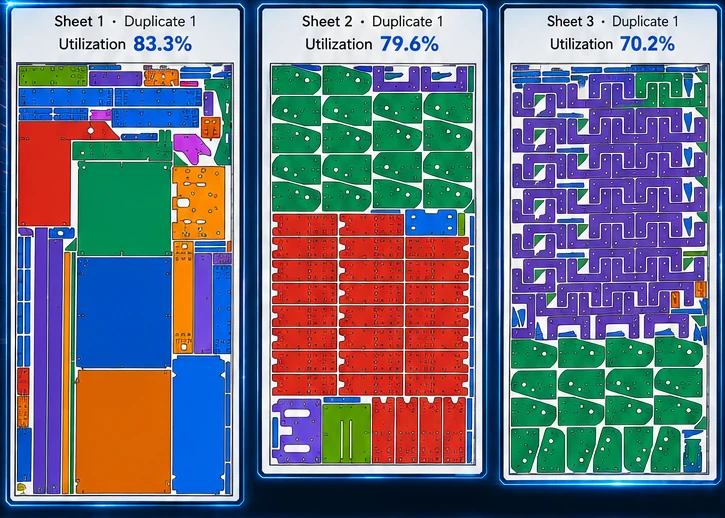
2D nesting software arranges flat parts on sheets, plates, rolls, or remnants so a cutting operation can produce the required quantities with less waste. The goal sounds simple—place shapes close together—but a production nest must also protect spacing, margins, rotations, grain, mirrored parts, internal holes, material identity, and the quality of the leftover stock.
True-shape nesting versus rectangle packing
Basic packing tools place the rectangular bounding box around each part. That is fast, but it wastes open areas around irregular profiles. True-shape nesting evaluates the actual exterior contour and can use concavities, openings, and compatible orientations.
A U-shaped bracket, curved plate, gusset, and ring should not be treated as ordinary rectangles. A capable engine evaluates their real outlines and searches for combinations a person may not see immediately.
What a production nest must protect
A useful nest should account for:
- Sheet width, length, and usable edge margins
- Minimum distance between parts
- Part quantities and priorities
- Allowed rotation increments or fixed orientation
- Grain and finish direction
- Mirrored or handed components
- Internal holes and usable openings
- Material, thickness, and stock identity
- Open entities, bend lines, and geometry requiring review
A dense layout that violates grain direction, overlaps contours, loses holes, or places a part outside the sheet is not a successful nest.
Material utilization and remnant quality
Utilization is the percentage of a sheet occupied by parts, but percentage alone does not tell the whole story. Two layouts can report similar utilization while leaving very different material. One may create a large rectangular drop that can return to inventory. Another may scatter the same leftover area into narrow strips that are difficult to reuse.
Practical nesting should consider immediate yield and the quality of the remaining stock. Nest XL Corporate connects nesting with remnant management, allowing useful drops to remain part of the material workflow instead of becoming undocumented scrap.
Nesting and quoting belong together
The nest determines how much material a job actually consumes. It also supplies inputs that affect the customer price: sheet cost, cut length, pierce count, machine time, setup, and reusable material value.
A quote based only on part area can miss poor sheet yield, high pierce counts, slow contours, or an expensive skeleton that cannot be reused. Nest XL connects the nested project with fabrication quoting so sales and production can work from the same information.
Where 2D nesting is used
Common applications include laser cutting, plasma cutting, waterjet cutting, routers, sheet metal fabrication, plate processing, gaskets, composites, wood, and plastic. The process changes the spacing and cost model, but the central goal remains the same: produce correct parts while controlling material loss and operational cost.
A practical workflow
- Import and inspect the DXF files.
- Confirm quantities, material, thickness, rotations, mirroring, and grain.
- Review open entities, bend lines, and internal geometry.
- Choose suitable sheets or remnants.
- Run the nest and examine utilization and leftover material.
- Calculate job cost and prepare the quote.
- Approve the job and export the production DXF.
- Record consumed sheets and reusable remnants.
Nest XL Standard focuses on local nesting, costing, quoting, and DXF export. Nest XL Corporate extends that workflow with stock control, automatic sheet selection, remnant inventory, quote management, and production status.
What to test before buying
Do not judge nesting software only by a colorful screenshot or sheet count. Test mixed quantities, long parts, concave parts, internal holes, different sheet sizes, and realistic spacing. Review the leftover material—not only the reported percentage—and confirm that quote values are traceable to the actual nest.