
Import drawings
Load DXF drawings, recognize parts, preserve internal holes, assign quantities, and inspect dimensions and cut information.
Nest XL gives fabricators a controlled path from individual DXF drawings to nested sheet layouts, material estimates, professional quotes, production reports, and licensed DXF export.
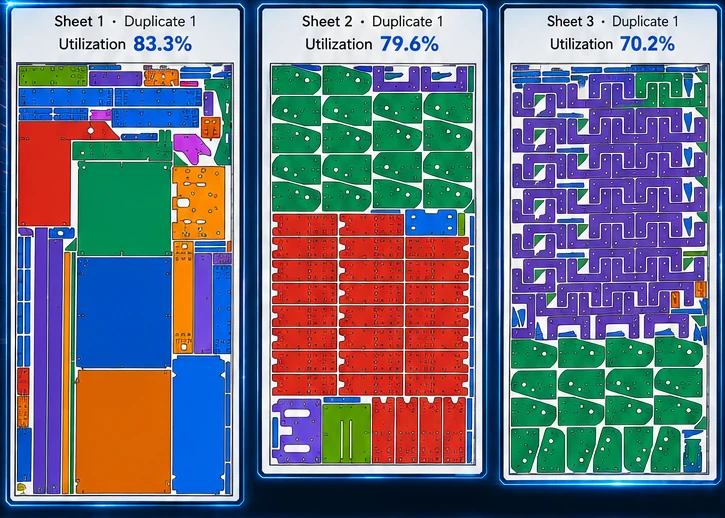
Nest XL connects geometry preparation, nesting rules, material cost, machine time, quoting, reporting, and production output so the finished nest carries useful business information—not just coordinates.
Load DXF drawings, recognize parts, preserve internal holes, assign quantities, and inspect dimensions and cut information.
Review open lines, bend lines, and non-closed entities before deciding whether they belong in the nest.
Choose rotation, mirror, grain, spacing, margins, priorities, groups, and whether other parts may occupy usable holes.
Create reports and quote documents, then export nested DXF production layouts when a valid license is active.
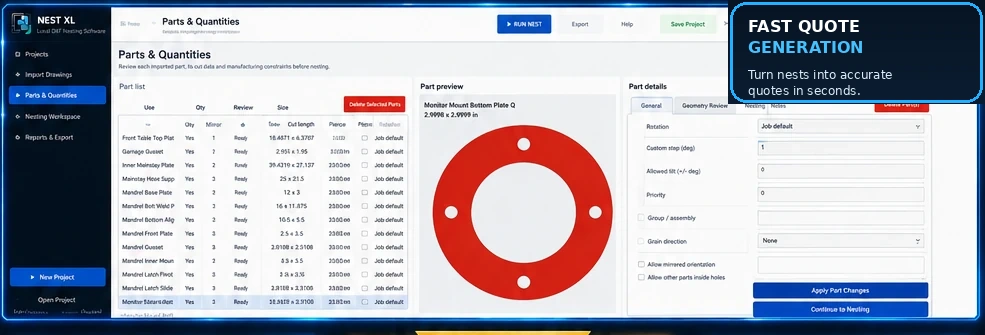
Use quantities, rotation increments, fixed orientation, mirroring permission, grain direction, priority, groups, spacing, margins, and nesting inside usable holes. Review open geometry and bend lines before they become production problems.
Material usage, sheet cost, cut length, pierce count, cut speed, pierce delay, machine hourly cost, setup, shipping, tax, markup, and custom items can all contribute to a professional customer quote.
Clear answers for evaluating Nest XL in a production workflow.
Support depends on the geometry present in the file. Demo Mode lets you test your own drawings before purchasing.
The workflow is designed to preserve internal holes and treat them as geometry, not separate parts.
Yes. Mirroring can be permitted or restricted on a part-by-part basis.
DXF work remains local. Internet access is used for purchase, activation, periodic license verification, and updates.
Demo Mode does not expire. Import, prepare, nest, cost, and quote. Activate a Standard or Corporate license when you are ready to export production DXF files.
Install either edition and use it in Demo Mode for as long as needed. A valid license is required only when exporting production DXF files.