
Prepare mixed orders
Combine many customer parts and quantities while keeping previews, dimensions, and manufacturing constraints visible.
Nest XL helps plasma cutting shops turn mixed DXF orders into controlled sheet layouts and defendable quotes. Review the geometry, apply spacing and orientation rules, calculate material and machine cost, and produce nested DXF files for the next stage of production.
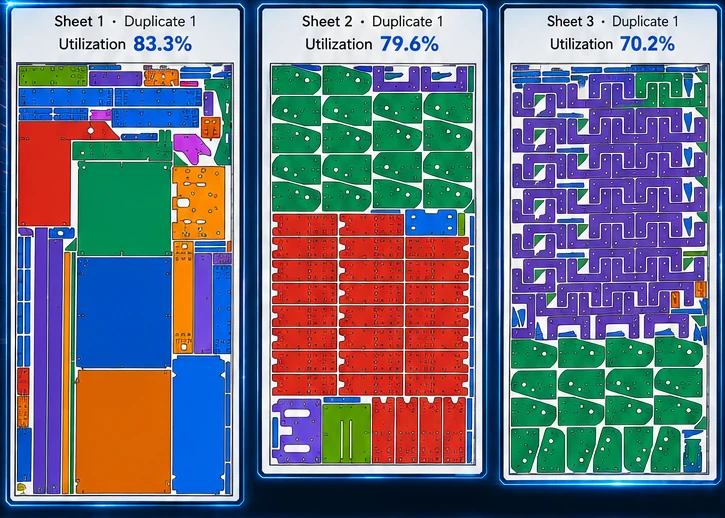
Nest XL connects geometry preparation, nesting rules, material cost, machine time, quoting, reporting, and production output so the finished nest carries useful business information—not just coordinates.
Combine many customer parts and quantities while keeping previews, dimensions, and manufacturing constraints visible.
Apply minimum part spacing, sheet margins, rotation choices, and fixed orientation based on the job and downstream cutting process.
Use material cost, cut length, pierces, speed, delay, hourly cost, setup, and markup to estimate and price the work.
Corporate can track full sheets and irregular remnants so usable material is easier to find and reuse.
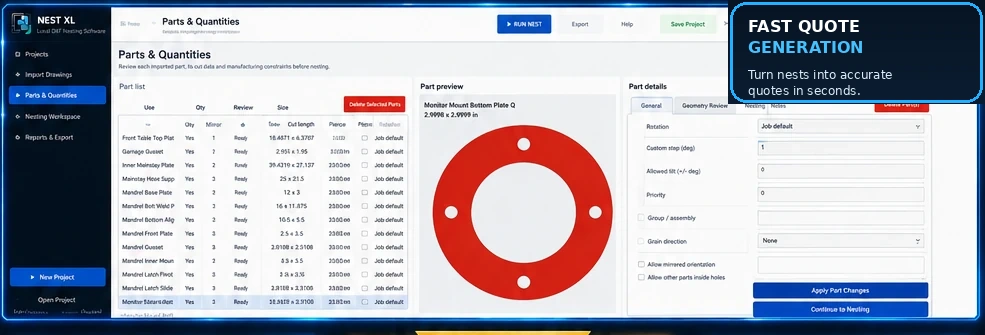
Use quantities, rotation increments, fixed orientation, mirroring permission, grain direction, priority, groups, spacing, margins, and nesting inside usable holes. Review open geometry and bend lines before they become production problems.
Material usage, sheet cost, cut length, pierce count, cut speed, pierce delay, machine hourly cost, setup, shipping, tax, markup, and custom items can all contribute to a professional customer quote.
Clear answers for evaluating Nest XL in a production workflow.
No. Nest XL handles DXF preparation, nesting, costing, quoting, and nested DXF output. Cutting technology remains in your plasma CAM or controller workflow.
Yes. Jobs can use configured sheets, and Corporate adds automatic selection among approved stock sizes and quantities.
Yes. You can limit rotation, use fixed orientation, or define custom angle steps as required.
The software returns to Demo Mode. Projects remain available, but production DXF export is blocked until a valid license is active.
Demo Mode does not expire. Import, prepare, nest, cost, and quote. Activate a Standard or Corporate license when you are ready to export production DXF files.
Install either edition and use it in Demo Mode for as long as needed. A valid license is required only when exporting production DXF files.