Local DXF nesting and quoting software

Turn every sheet into more profit.

Nest XL does far more than arrange parts. It helps you prepare drawings, control part rules, calculate real production cost, build professional quotes, protect valuable remnants, and move work toward production—all while your DXF files stay on your own computer.

No-expiration Demo ModeWindows desktop softwareProduction DXF export with license
Nest XL Corporate interface showing production nesting and workflow tools
From DXF to dollar valueNesting, costing, quoting, stock, and production
Quote with confidence. Material, machine time, markup, tax, setup, and shipping.Nest with control. Rotations, mirroring, grain, holes, margins, and spacing.Protect material. Corporate stock and remnant management.
A complete job-preparation system

This is not just a nesting button.

Every stage of the job feeds the next one, so the estimate, quote, nest, material choice, and production output stay connected.

01

Intelligent DXF preparation

Import complex geometry, preserve internal holes, review open lines and bend lines, set quantities, and decide exactly how every part may be handled.

Geometry reviewPart quantitiesOpen-line control
02

Part-by-part nesting rules

Control rotation increments, grain direction, mirroring, priority, groups, and whether smaller parts may be placed inside usable holes.

Mirror optionsGrain directionNest in holes
03

Professional quoting

Convert the actual nest into a polished customer quote with production cost, markup, tax, setup, shipping, custom line items, customer information, terms, and your company branding.

Branded PDF quotesCustom pricingReal job cost
04

Production-ready output

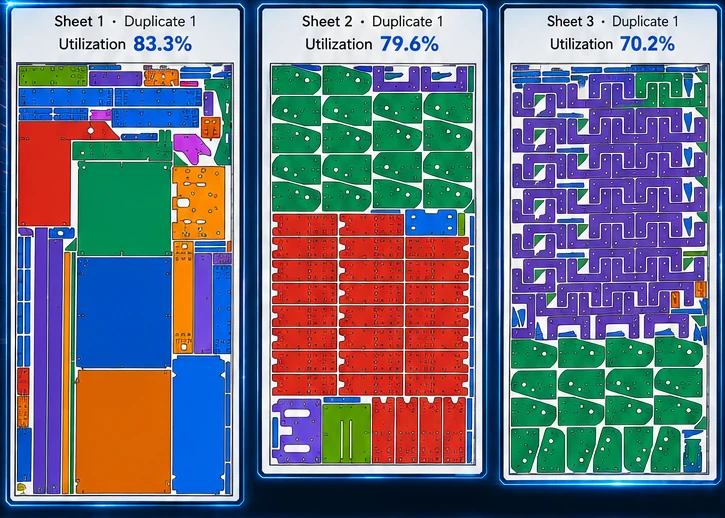
Review sheets, inspect utilization, generate reports, and export DXF production files when the proper license is active.

Multi-sheet jobsPDF & CSVDXF export
Quoting that earns its place in the shop

Stop guessing what a job should cost.

Nest XL uses the job itself to help build the quote. Material usage, sheet cost, cut length, pierce count, cut speed, pierce delay, machine hourly rate, and other production inputs become the foundation for pricing—not a number pulled from memory.

Calculate production costMaterial cost plus estimated machine time based on actual cut and pierce data.
Build the selling priceAdd markup, setup/programming, shipping, tax, adjustments, or fully custom line items.
Present it professionallyCreate a branded customer-facing PDF with quote number, validity, contact details, notes, and payment terms.
Corporate keeps the historyArchive quote PDFs and project snapshots, see Quoted, In Process, and Expired status, and reopen work without rebuilding it.
See Corporate Quote Management
QUOTE ENGINEBuilt from the real nest
MaterialSheet usage × cost
Machine timeCut + pierce estimate
Pricing controlsMarkup · setup · shipping · tax
Customer outputBranded PDF quote
From geometry to a price you can defend.
A clear production interface

See more. Decide faster.

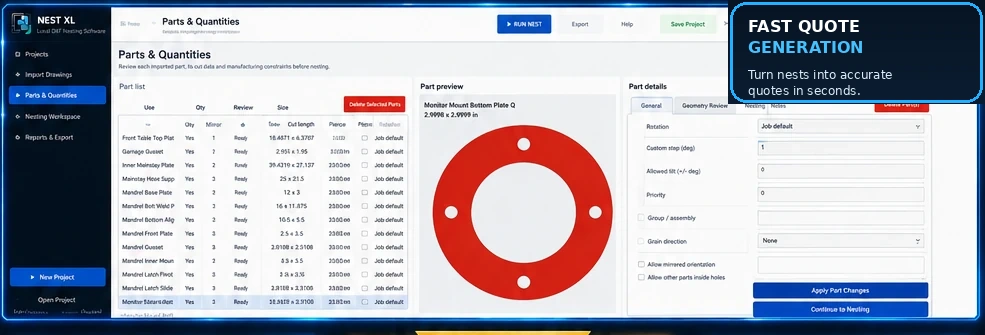
The Parts & Quantities workspace keeps geometry, manufacturing rules, dimensions, quantities, and part controls visible together instead of burying them in disconnected dialogs.

Large view of the Nest XL Parts and Quantities interface
Review every imported partDimensions, cut length, pierces, geometry status, quantities, and preview.
Apply manufacturing rulesRotation, custom angle steps, mirror permission, grain, priorities, and grouping.
Move forward with confidenceResolve questionable geometry before it reaches the nesting workspace.
Nest XL nested sheet results with colored parts and usable material remaining
Corporate material control

Know what material you own—and what the job will consume.

Corporate connects nesting with full-sheet stock, unit cost, available quantity, irregular remnants, storage details, and production release. It can select from approved sheet sizes and preserve useful leftovers as managed assets for the next job.

  • Track material, thickness, dimensions, quantity, cost, heat, and storage metadata
  • Automatically choose among approved full-sheet sizes and available quantities
  • Reuse irregular Clean Drop and Exact Skeleton remnant files
  • Consume stock when a quote is moved into production
  • Create qualifying production remnants and return them to inventory
Explore Corporate
Choose your edition

Power for one shop. Control for the whole workflow.

Both editions share serious nesting and quoting tools. Corporate adds the operational layer that keeps quotes, stock, remnants, and production connected.

Nest XL Standard

Nest, cost, quote, and export.

Ideal for fabricators who need a strong local DXF workflow without a full inventory and production-management system.

  • DXF import and geometry review
  • Mirror, rotation, grain, priority, and hole nesting controls
  • Multi-sheet automatic nesting
  • Material and machine cost estimation
  • Branded PDF quote generator
  • PDF, CSV, and licensed DXF export
$49/ month
Discover Standard
Nest XL Corporate

Run the material and quote lifecycle.

Built for production organizations that need deeper control, repeatability, stock accountability, and a searchable history of customer work.

  • Everything in Standard
  • Quote archive, status, expiration, and project snapshots
  • Automatic sheet selection by stock and cost
  • Full-sheet and irregular remnant inventory
  • Production stock consumption and remnant creation
  • Production packages, audit history, and advanced reporting
$149/ month
Discover Corporate
Start when the job is ready

Test the workflow before paying.

Demo Mode has no expiration. Purchase a license when you are ready to export production DXF files.

Standard Membership
$49/ month

Serious nesting, detailed job costing, and professional quoting for independent fabricators and small shops.

  • Complete Standard feature set
  • Unlimited projects and nests
  • Branded quote generation
  • Production DXF export
  • One authorized computer
Standard 24-Hour Pass
$19.99one time

Unlock the complete Standard workflow and production export for a time-sensitive job.

  • All Standard features
  • Starts at first activation
  • 24 continuous hours
  • No recurring billing
  • One authorized computer
Ready to see it work?

Bring in your DXF files. Build the nest. Price the job.

Download the no-expiration Demo and experience the workflow with your own parts before choosing a membership.

Built for sheet-cutting workflows

2D nesting for laser, plasma, waterjet, CNC, and fabrication.

Nest XL works as the DXF preparation, nesting, costing, and quoting layer before compatible machine-specific CAM.

2D nesting software

Arrange irregular DXF parts across sheet material with controlled spacing, margins, rotation, mirroring, grain, quantities, and multi-sheet output.

DXF nesting software

Prepare imported drawings, preserve holes, review geometry, build nests, and export production DXF layouts.

Laser cutting nesting

Use cut length, pierces, machine rate, material cost, and the actual nest to prepare laser jobs and quotes.

Plasma cutting nesting

Organize mixed DXF quantities, practical spacing, material use, quote values, and nested production layouts.

Waterjet nesting

Control orientation and high-value material use while estimating and quoting waterjet sheet work.

Sheet metal nesting

Connect DXF parts, grain, handed components, sheet cost, quoting, stock, remnants, and production.

Fabrication insights

Practical knowledge that helps shops cut smarter.

Explore detailed articles about nesting, DXF preparation, quoting, stock, and remnants.

View all articles
System requirements

Built for a modern Windows shop computer.

Nest XL runs locally on your PC. More memory and processor capacity are especially helpful for jobs containing many parts or complex DXF geometry.

WIN
Operating system

Windows 10 or Windows 11, 64-bit.

CPU
Processor

Modern 4-core x64 processor or better recommended.

RAM
Memory

8 GB RAM; 16 GB or more recommended for larger jobs.

HD
Display & storage

1366 × 768 minimum display, 1920 × 1080 recommended, with 2 GB free storage.

NET
Internet connection

Required for purchase, activation, periodic license verification, and updates. Your DXF files remain on your computer.