Professional 2D nesting software

2D nesting software built for sheet-based fabrication.

Import DXF parts, define manufacturing rules, build efficient multi-sheet nests, calculate job cost, create customer quotes, and export production-ready DXF layouts from one local Windows application.

Windows 10 & 11Local DXF workflowNo-expiration Demo Mode
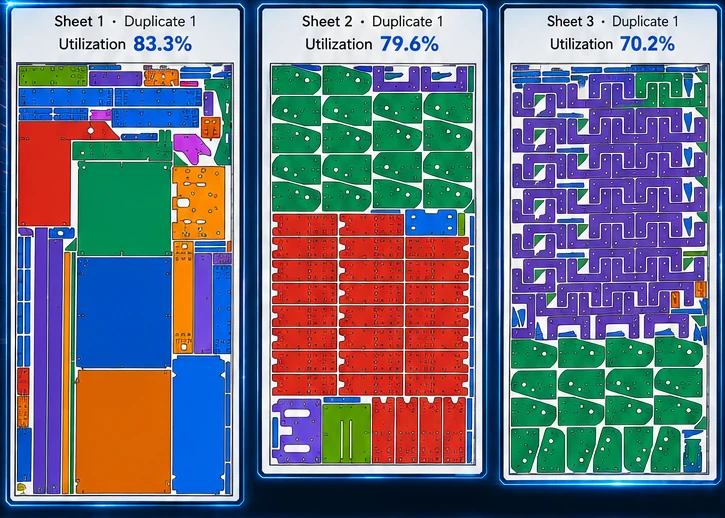
2D nesting software built for sheet-based fabrication. showing nested DXF parts on sheet material
Built for real fabricationPrepare · nest · cost · quote · export
A complete workflow

More than automatic part placement.

Nest XL connects geometry preparation, nesting rules, material cost, machine time, quoting, reporting, and production output so the finished nest carries useful business information—not just coordinates.

01

Prepare DXF geometry

Review closed shapes, internal holes, open entities, bend lines, dimensions, cut length, pierces, and part quantities before nesting.

02

Control orientation

Set rotation increments, fixed orientation, grain direction, mirror permission, priorities, groups, margins, and minimum spacing.

03

Nest across sheets

Place quantities across one or more sheet sizes while preserving holes and respecting the production rules assigned to each part.

04

Cost and quote

Use material, cut, pierce, machine, setup, markup, shipping, tax, and custom values to build a branded customer quote.

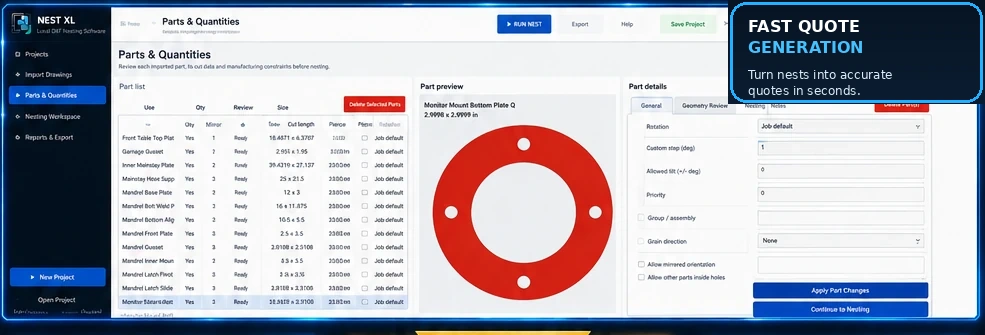
Nest XL interface for DXF part preparation, quantities, rotation, mirroring, and geometry review
Control every part

Set the rules the way your shop needs them.

Use quantities, rotation increments, fixed orientation, mirroring permission, grain direction, priority, groups, spacing, margins, and nesting inside usable holes. Review open geometry and bend lines before they become production problems.

  • Preserve exterior geometry and internal holes
  • Allow smaller parts inside usable holes when appropriate
  • Control mirrored orientations part by part
  • Review sheet utilization and usable remaining material
  • Export PDF and CSV reports
  • Unlock production DXF export with the proper license
Explore Corporate Control
Cost and quote the actual job

Turn nesting data into a price you can defend.

Material usage, sheet cost, cut length, pierce count, cut speed, pierce delay, machine hourly cost, setup, shipping, tax, markup, and custom items can all contribute to a professional customer quote.

Material costUse sheet dimensions, quantity, unit cost, and actual nest consumption.
Estimated machine timeBuild estimates from cut length, pierces, speed, delay, and hourly rate.
Professional quote outputCreate branded PDF quotes with customer data, terms, notes, and validity.
Common questions

What shops usually ask.

Clear answers for evaluating Nest XL in a production workflow.

What is 2D nesting software?

It arranges flat parts on sheet material to improve utilization while respecting spacing, margins, orientation, quantities, and geometry constraints.

Does Nest XL generate machine G-code?

Nest XL prepares and exports nested DXF layouts. Your compatible CAM or machine software can then apply tooling, leads, cutting technology, and machine code.

Can it handle more than rectangles?

Yes. Nest XL is designed around imported DXF geometry, including irregular and concave parts with internal holes.

Can I test it first?

Yes. Demo Mode does not expire. A license is required only for production DXF export.

Use your own DXF files

See how Nest XL handles your parts before paying.

Demo Mode does not expire. Import, prepare, nest, cost, and quote. Activate a Standard or Corporate license when you are ready to export production DXF files.