
DXF geometry review
Preserve exterior profiles and internal holes, identify open geometry, review marking or bend lines, and decide whether questionable entities should be ignored, marked, or cut.
Standard gives fabricators a serious local workflow for preparing geometry, controlling how parts may nest, estimating real production cost, creating branded customer quotes, and exporting production DXF files.
Standard gives you the tools to define what is allowed instead of accepting a blind automatic result.
Preserve exterior profiles and internal holes, identify open geometry, review marking or bend lines, and decide whether questionable entities should be ignored, marked, or cut.
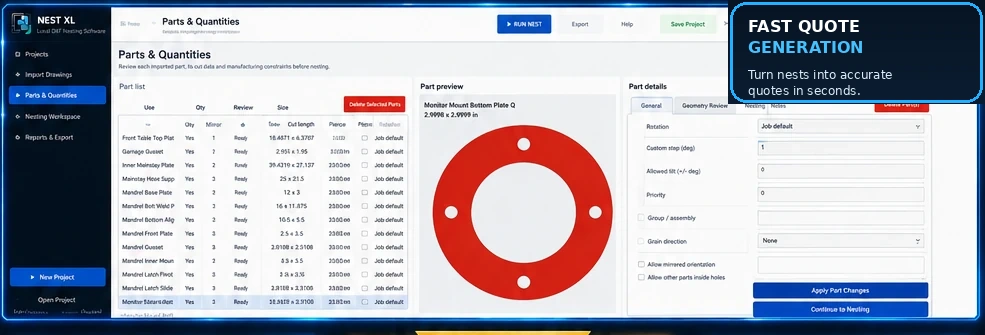
Fix a part in place, choose legal rotation increments, set grain direction, permit mirrored orientations, and prevent unwanted flips when manufacturing rules matter.
Assign priorities, keep assemblies organized, set quantities, and allow smaller parts to occupy usable internal holes when the geometry and job rules permit it.
Standard connects the nest to the numbers that determine profitability. It estimates material and machine cost using the actual project, then lets you shape the final selling price and presentation.
Review the list, preview the selected part, and change its manufacturing constraints without losing sight of the job.
Continue across the available sheet count while maintaining the project margin, part spacing, and legal orientations.
Work with concave parts, internal holes, circles, repeated populations, and mixed part families.
Watch progress, pause or stop, inspect placements, fit the view, and review the result before export.
Create PDF and CSV reports in Demo Mode. An active Standard license unlocks production DXF export.
Ongoing Standard export access and the latest applicable Standard releases while the subscription remains active.
The complete Standard feature set for one urgent production window with no recurring charge.
Install Standard, import a real job, work through geometry, nesting, costing, and quoting, and purchase only when you are ready to export.
Install either edition and use it in Demo Mode for as long as needed. A valid license is required only when exporting production DXF files.